Show the neurologist what happens between visits.
PD Tracker is a free daily symptom and medication tracker for Parkinson's caregivers. Voice-first logging, medication and meal tracking, trend charts, and a clinician-ready report you can hand over on a USB stick.
Free, with an open source release planned. Runs fully offline on your own computer.
Built around the caregiver's day
Voice-first logging
Tap the mic and talk. PD affects fine motor control, so typing shouldn't be required. A complete check-in takes under two minutes.
Medication timing, tracked
Schedule doses by interval or by flexible cues like bedtime, with meals, or as needed. See on-time, late, and missed doses, and how long each medication's effect lasts.
Everything on one chart
Symptom lines, medication dose markers, and meal markers together. Toggle symptoms on or off and switch between day, week, and month views.
Video where numbers fall short
Capture tremor episodes, freezing, or dyskinesia from any page. Videos attach to check-ins and incidents, giving doctors context that numbers alone can't show.
Built for the 15-minute visit
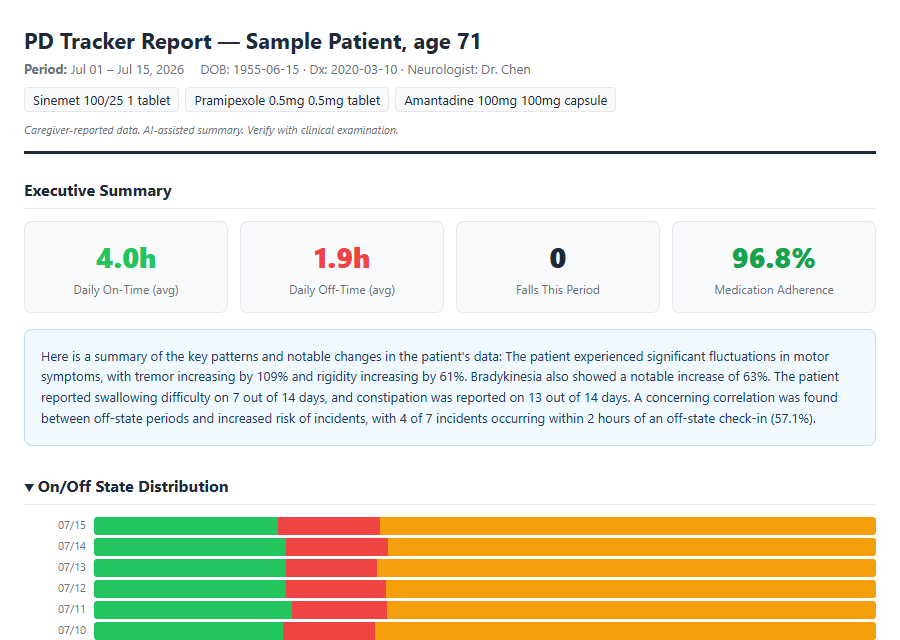
Neurologists see the patient for a few minutes every few months. One click produces a pre-appointment report that shows them the weeks in between: an executive summary, symptom trends, wearing-off analysis, and cross-correlation patterns between medications, meals, sleep, and symptoms.
The numbers are computed. Nothing guesses them.
Every figure in the report is calculated from what you recorded. PD Tracker ships with no AI model and does not install one, so out of the box no language model touches your data at any point.
If you choose to install a local model yourself, it can write a plain-language summary of what the numbers already say. That summary is checked against your data before it appears, retried if it disagrees, and withheld entirely if it still cannot be verified, with the report showing plainly that it was withheld. When a summary is used the report is labelled an AI-assisted summary, so a clinician can always tell a computed statement from a written one. The model runs on your machine and no data leaves it.
Hand it over on a USB stick
Package the report and videos into a zip file. Extract it onto a USB stick, hand it to the neurologist, and they open it in any browser. Scroll the frame to read the full report. This is a real report generated by PD Tracker from sample data.
How it works
Download and install on Windows
Windows may show a SmartScreen notice because PD Tracker is new independent software. Choose "More info", then "Run anyway".
Launch it
A console window shows your connection addresses. Keep it open while using the app.
Open it in a browser
On the computer itself, or from a tablet or phone on the same WiFi. A caregiver can log from a tablet while the computer handles storage and analysis.
Log the days
Quick check-ins, medications, meals, incidents, and video when it helps. The dashboard counts down to the next appointment.
Generate the report before the visit
One click, then export it with the videos to a USB stick for the neurologist.
Your family's health information stays with your family
Everything runs on your own computer. Health data this personal should not need an account or a server.
Built by a caregiver
I built this for my mom when she was diagnosed with Parkinson's. The doctors only see her for 15 minutes every few months, and we needed a way to show them what happens in between.
The existing apps were either too clinical or too simple. We needed something that a caregiver could use quickly, that produced reports a neurologist would actually read, and that worked without an internet connection. So I built it.
PD Tracker is free because families dealing with Parkinson's have enough to worry about.
Make the next visit count.
Windows. Free, with an open source release planned. Download coming with public release.
Software that respects your attention.
PD Tracker is not a medical device. It does not provide medical advice, diagnose conditions, or recommend treatments. Always consult your healthcare provider.